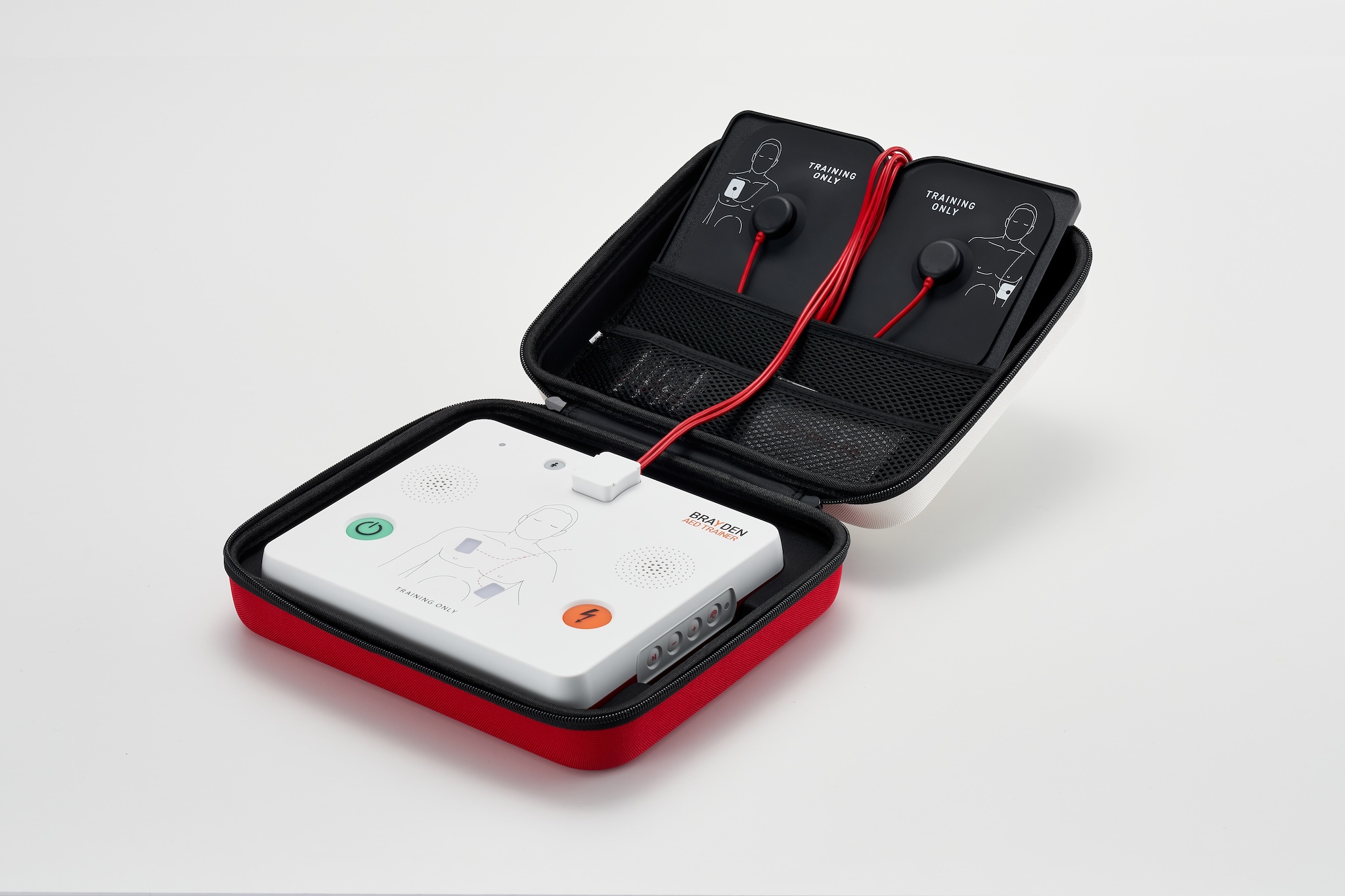
BRAYDEN AED Trainer (model: IT23)
The BRAYDEN AED Trainer is designed to ensure that users can quickly and skillfully operate any AED (Automated External Defibrillator) they encounter in emergency situations.
The BRAYDEN AED Trainer has its design and features which users can easily adapt to different AEDs used in real-life emergency situations. It provides specific scenarios for training on how to respond to cardiac arrest and handle other unexpected emergencies.
In particular, this product is the first to develop and apply Optical Sensing Technology to pads, allowing for accurate detection of pad attachment during training. This technology represents a significant innovation over the traditional AED training methods, which required pads to be attached to the body, then connecting the connector of the pads to acknowledge the pad attachment. This training enables users to be familiarize and Practice recently introduced pre-connected AED systems.
Additionally, the innovative Gel-Pads can have their adhesive properties restored simply by rinsing them with water. This allows for repeated usage, offering a significant cost-saving advantage compared to training with disposable pads.
The BRAYDEN AED Trainer, optimized for AED training, can be connected to our comprehensive CPR training solution, VivusCardio Connect, based on the user's needs. This integration provides real-time feedback and accurately measures scoring for AED Trainer sessions. This service is an integrated solution that includes not only a realistic and fully engaging AED training, but also CPR training, enabling the establishment of a more systematic, efficient and complete resuscitation training system.
Basic Features
- Automatic/Semi-automatic AED mode
- Adult/Pediatric mode
- Clear and Precise Voice Instruction
- Pause/Continue Function
- Metronome Features (For Compression)
- Volume Control (5 Levels)
- 6 Different Scenarios, 4 Different Impromptu Events Available
- 9 Language Preloaded (Additional Language available upon Request)
- Korean, English, Spanish, French, German, Italian, Polish, Chinese (Mandarin), Japanese Available
Key Features
- Optical Sensing Pads with attachment detection (Pre-connected Pads Training possible)
- Gel-Pads with more than 200 Reusable Counts (Can be reused after rinsing, when the adhesion diminishes.)
- LED indicators for Pads attachment indication
- Integration with VivusCardio Connect CPR & AED Training Solution
- Remote Controller Features (VivusCardio Controller App)
- Software updates via app (e.g., CPR guideline changes)
Product Specification
- Weight: 600g (excluding case)
- Size: 22cm(W) x 19cm(H) x 4cm(D)
- Operating temperature: 0°C ~ 40°C (32°F ~ 104°F)
- Storage temperature: -20°C ~ 60°C (-4°F ~ 140°F)
- Storage humidity: Relative humidity 5% ~ 95% (non-condensing)
- Power: AA 1.5V batteries (4), USB-C type (adapter sold separately)
- Firmware Update: VivusCardio Controller App (AED-T Configuration)
- Warranty: 2 years (Consumables Excluded)
Wireless Specification
- Wireless type: 2.4 GHz Low-Power Wireless
- Operating frequency: 2402~2480 MHz
- Max RF output: 0 dBm (approx. 1 mW)
AED Trainer Components Packaging
Brayden AED Trainer 1 Set
- AED Trainer Main Unit (1)
- AED Trainer Carry Case (1)
- Gel-Pads Plate (1)
- Gel-Pads (2)
- Optical Sensing Pads Cable (1)
- AED Prep kit Card Set (1)
- AA Type Alkaline Batteries (4)
Product Overview
AED Trainer Components
* Please ensure all components are present before using the product.
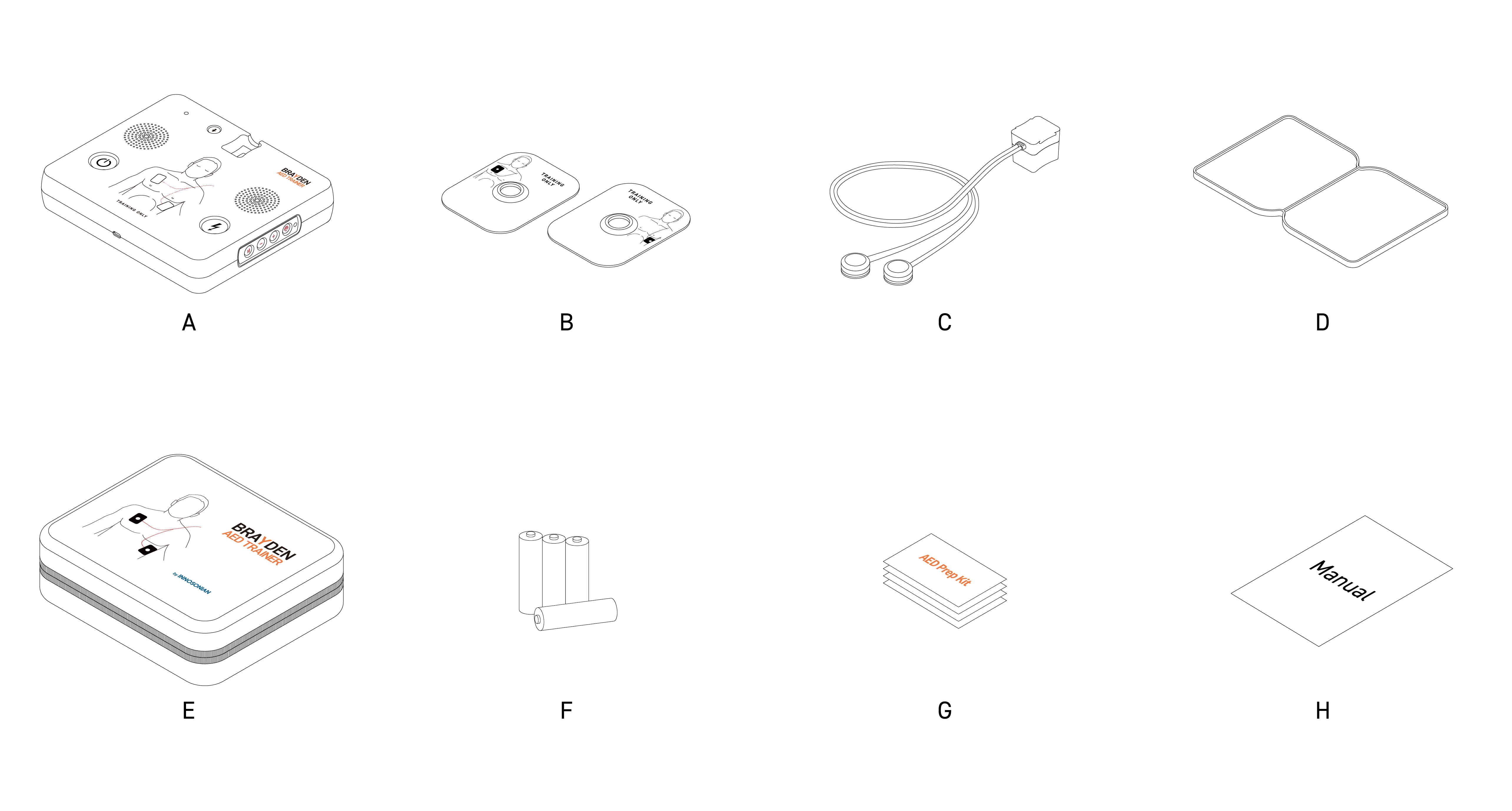
| A.Main Unit | B.Gel-Pads (Left, Right) | C.Optical Sensing Pads Cable (1.2m) | D.Gel-Pads Plate |
| E.Carry Case | F. AA type Battery (4) | G.Prep kit Card Set |
AED Trainer Components Packaging
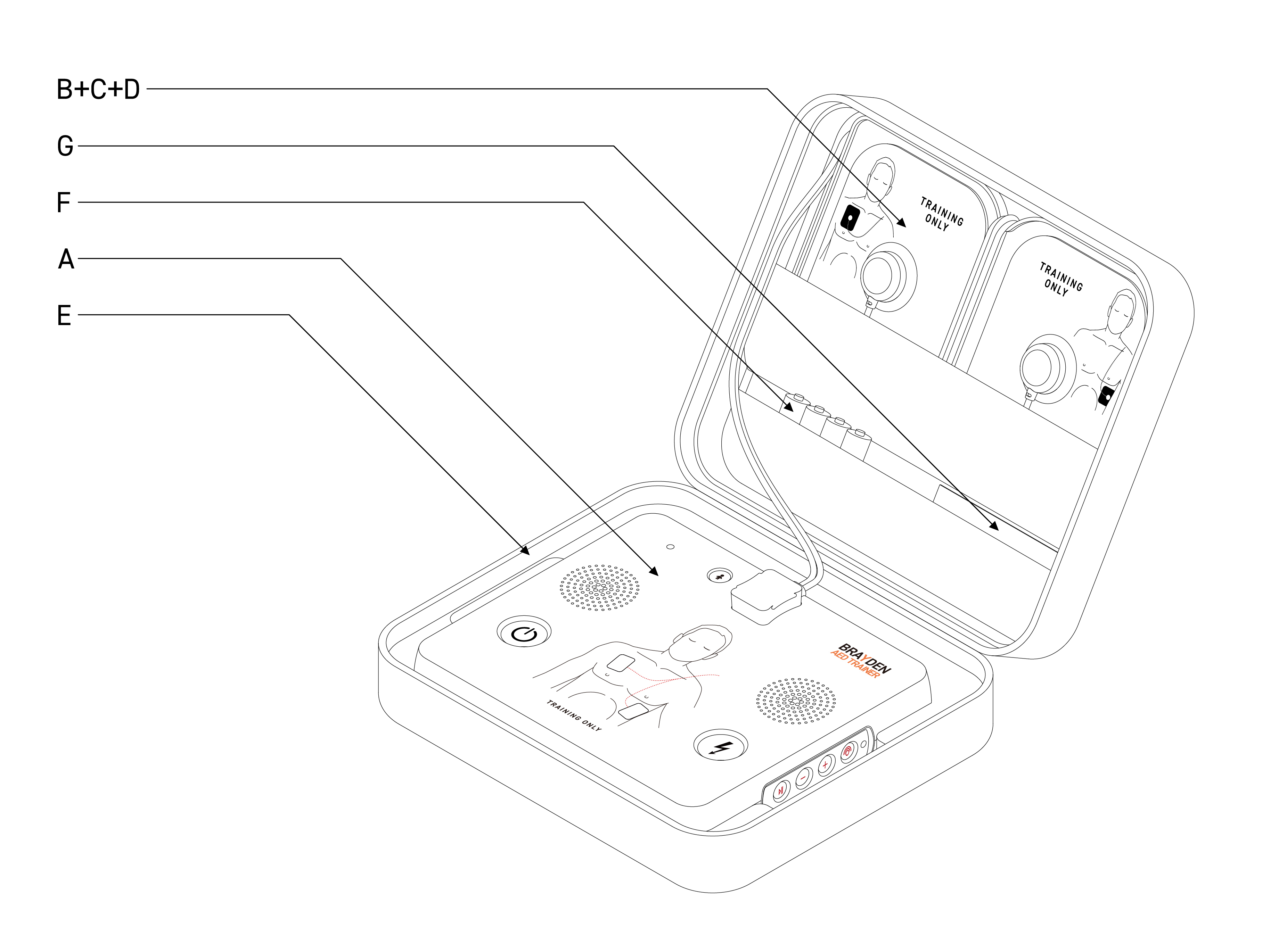
AED Trainer Parts
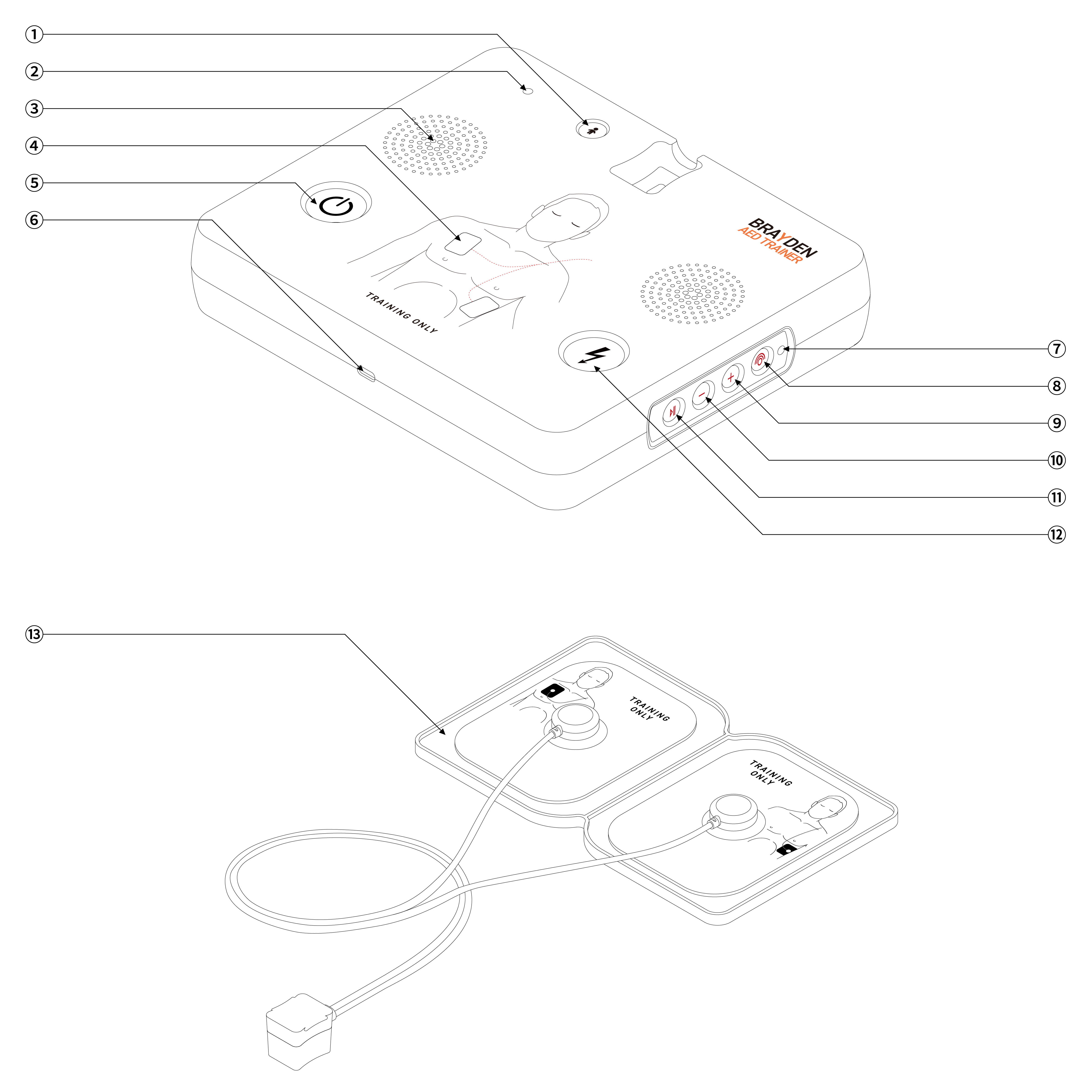
| ①Child Button | ②Power Indicator LED | ③Speaker | ④Pads Sensing LED | ⑤Power Button |
| ⑥USB-C Port | ⑦Wireless Connectivity LED | ⑧Wireless Connectivity Button | ⑨Volume Up Button | ⑩Volume Down Button |
| ⑪Pause/Resume Button | ⑫Shock Button | ⑬Optical Sensing Gel-Pads Unit |
Key Operating Instruction
Starting AED Training with AED Trainer Alone (without VivusCardio Connect):
Press the <Power Button> on the front of the device to start the Voice Prompt immediately.
Ending AED Training:
Press and hold the <Power Button> on the front of the device to end the training.
To restart the training, press the <Power Button> again.
Complete Powering Off of AED Trainer:
Option 1: Press and hold the <Wireless Connectivity Button> on the right side of the device to completely power off the product.
Option 2: If there is no activity or movement for 20 minutes, the device will automatically power off completely.
Turning ON/OFF of Optical Sensing Pads Function:
If you do not want to use the Optical Sensing Pads function, press and hold the <Pause/Resume Button> on the control panel (on the right side of the device) to turn off the Optical Sensing Pads recognition feature. (*When the Optical Sensing Pads function is OFF, you must connect the Pads connector after attaching the Pads, in order for the Pads to be recognized as attached.)
Training Configuration:
(* The corresponding app must be installed on the mobile device prior to use)
Press the <Wireless Connectivity Button>on the Control Panel (on the right side of the device). The Wireless Connectivity LED will light up in blue. Open the VivusCardio Controller app on your mobile device. The AED Trainer is automatically detected. Select it from the search results to connect. Press the “<” button at the top left to choose the necessary settings menu and configure the training conditions.
Integrated Training with VivusCardio Connect Solutions:
(* The corresponding app must be installed on the mobile device prior to use)
Press the <Wireless Connectivity Button> on the Control Panel (on the right side of the device). The Wireless Connectivity LED will light up in blue. Open the VivusCardio Connect app on your mobile device. Follow the process of the VivusCardio Connect integrated training to proceed AED Training.
Cleaning of Gel-Pads:
If the adhesion of the Gel-Pads decreases, you can separate and clean the pads, then dry them for reuse.
Disconnect the Optical Sensing Cable and the Gel-Pads.
WARNING: DO NOT SUBMERGE THE CABLE OR SENSOR IN WATER.
Gently rinse the adhesive surface of the detached Gel-Pads under running water for about 10 seconds to remove any debris and restore adhesion.
Be careful not to damage the Gel portion of the adhesive surface during cleaning.
6 Scenarios and 4 Impromptu Events
| Category | Detailed Scenario / Event Description |
|---|---|
| Scenario 1 (Pre-Set) | Shock → No shock |
| Scenario 2 | Shock → Shock → No shock |
| Scenario 3 | Shock → Shock → Shock → No shock |
| Scenario 4 | No shock → Shock → No shock |
| Scenario 5 | Shock |
| Scenario 6 | No shock |
| Note: After the scenario is completed, the final step will be repeated. | |
| Event 1 | “System error.” |
| Event 2 | “Patient movement detected. Please make sure the patient stays still.” |
| Event 3 | “Low battery. Please replace with a new battery.” |
| Event 4 | “The pads connection is not poor. Please press the pads firmly.” |
| ※ At the event, the system will pause after the corresponding voice prompt has been played. To resume, press the <Pause / Resume Button>. |
Product Maintenance
Product Care and Cleaning Instruction
- Always keep the product clean and store it in a safe place to avoid damage.
- Inspect all cables for any signs of breakages, exposure, or disconnect before use.
- Inspect Gel-Pads for any signs of cracks, tears or other damages before use.
- If the Gel-Pads lost its adhesion, try cleaning the Pads to reuse.
If adhesion is not restored after cleaning, replace the Gel-Pads.
- The Optical Sensing Pads Cable of the Gel-Pads can be replaced as required.
- Do NOT submerge any parts (other than Gel-Pads) of the device in water.
Warranty Information
This product is covered by 2-year warranty from the date of purchase, excluding consumable parts.
Warranty coverage may be void in the following situations.
- Damage or defects caused by misuse, negligence, or improper handling.
- Damage or defects caused by repairs from unauthorized retailer or service center, or the use of non-approved replacement parts from unauthorized supplier. .
- Damage or defects caused by improper storage or use in unsuitable environments, such as those with high temperatures, high humidity, or exposure to harmful chemicals.
- Damage or defects caused by natural disasters or events beyond the manufacturer’s control, including but not limited to fire, earthquake, flood, or lightning, etc.
- Any alterations of the purchase date, customer information, retailer details, or product serial number.
Certifications
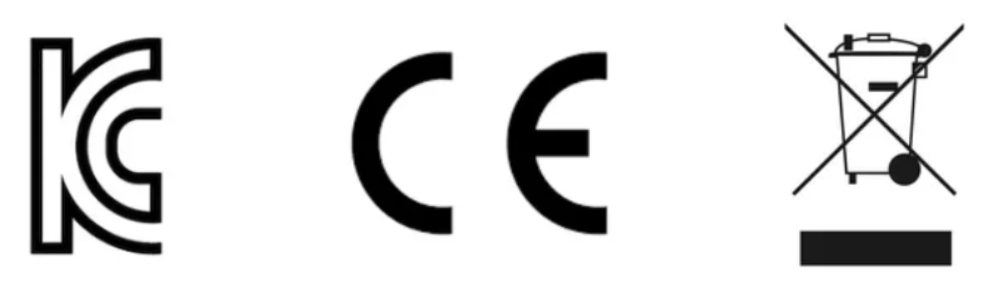
EU Regulatory Compliance Information
- This device has been assessed for conformity with the CE directives and complies with the Radio Equipment Directive (RED) 2014/53/EU. The EU Declaration of Conformity (DoC) is available from the manufacturer upon request.
Product Disposal
- Do not dispose of this product with household waste. Please use designated electronic waste collection points or recycling facilities.
FCC statement
- FCC ID : 2BK7L-IT23
- This device complies with Part 15 of the FCC Rules. Operation is subject to the following two conditions: (1) this device may not cause harmful interference, and (2) this device must accept any interference received, including interference that may cause undesired operations.
Battery Usage and Replacement Recommendations
- For optimal operation of the product, please use AA-sized alkaline batteries and replace all 4 batteries at the same time.
- Do not dispose of used batteries with household waste. Recycle or dispose of batteries in accordance with all federal, state, and local laws. To prevent the risk of fire and explosion, do not expose batteries to heat or incinerate them.
Product and Service Inquiries
Innosonian, Inc.
E-mail. sales@innosonian.com
Tel. +82 2 533 9410
Fax. +82 70 8673 5285
Add. 4th Floor, 62 Bangbae-Ro, Seocho-Gu, Seoul, Republic of Korea. 06704
Innosonian Europe
Email. hello@innosonian.eu
Tel. +44 (0) 3333 44 55 34
Add. 1 Chancerygate Way, Farnborough, Hampshire, GU14 8FF, United Kingdom
Innosonian America
Email. hello@innosonian.us
Tel. (551) 227 3100
Add. 5760 NC 96 Hwy, Youngsville, North Carolina, 27596, United States
Product: Brayden AED Trainer
Model: IT23
Manufacturer / Manufacture Country : Innosonian Inc. / Republic of Korea
v1.0.2